Retopology
Overview
The Retopology tool optimizes an existing Static Mesh by reducing or rebuilding its topology. It provides control over the retopology method, output topology, face limit, and texture baking before automatically importing the generated mesh into Unreal Engine.
Tool Inputs
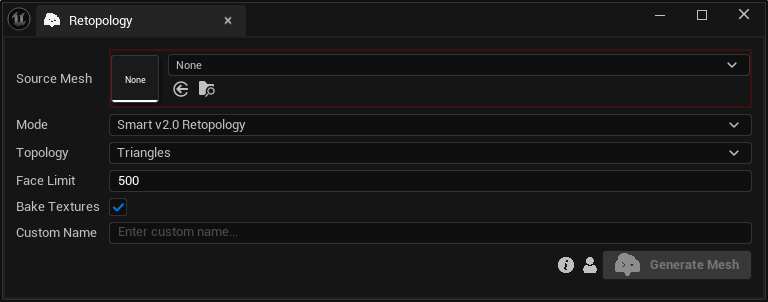
Inputs:
Source Mesh:The Static Mesh to be retopologized.Mode:Choose between “Basic v1.0 Decimation”, which reduces the mesh's face count, and “Smart v2.0 Retopology”, which rebuilds the mesh topology.Topology:Choose between “Triangles” and “Quads”.Face Limit:The target maximum number of faces. The supported range depends on the selected mode and topology: 500–2,000,000 for “Basic Triangles”, 500–150,000 for “Basic Quads”, 500–20,000 for “Smart Triangles”, and 500–10,000 for “Smart Quads”.Bake Textures:Bakes the source mesh's textures onto the generated mesh. This option is available only when using “Smart v2.0 Retopology”.Custom Name:An optional name for the generated mesh. Leave it blank to use the default name.
warning
Quad topology is preserved in the downloaded result, but the mesh is triangulated when imported into Unreal Engine.