Auto Rig
Overview
The Auto Rig tool converts a riggable Static Mesh into a Skeletal Mesh.
Tool Inputs
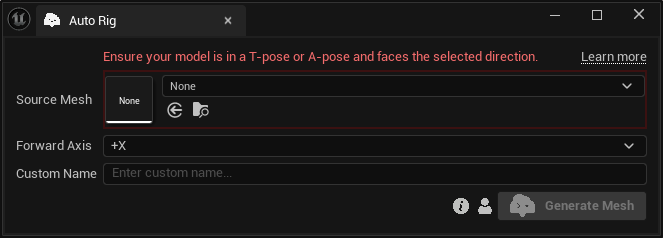
Inputs:
Source Mesh:The Static Mesh to be auto-rigged.Forward Axis:The direction the source mesh currently faces. Choose between “+X”, “+Y”, “-X”, and “-Y”. StudioTwin rotates the exported mesh to face +X during auto-rigging.Custom Name:An optional name for the generated skeletal mesh. Leave it blank to use the default name.
warning
Choose the Forward Axis that matches the direction your source model currently faces. StudioTwin uses this setting to orient the mesh correctly during export, helping produce the best possible auto-rigging results. Follow the mesh preparation guide to prepare the source mesh and select the correct forward axis.
Sample Mixamo retargeters
Auto Rig results use a Mixamo rig and bone naming convention. StudioTwin provides sample retargeters in the plugin's StMotion/Mixamo content folder for retargeting StudioTwin animations to Mixamo rigs:
RTG_SMPLToMixamo_APosefor meshes in an A-pose.RTG_SMPLToMixamo_TPosefor meshes in a T-pose.
Choose the sample that matches your mesh's pose and adjust its retargeting settings to suit your character and animation needs.