Load Auto Rigged Mesh
Overview
The Load Auto Rigged Mesh tool imports a previously generated auto-rigged GLB file and prepares its skeleton for use with StudioTwin rigs and retargeters. A standard GLB import does not perform this preparation.
info
Use the Load Auto Rigged Mesh tool instead of simply importing the .glb file into Unreal Engine. During import, StudioTwin post-processes the result's skeleton to align it with the provided rigs and retargeters, allowing the mesh to be used immediately in retargeting workflows. A standard drag-and-drop import does not perform these operations.
Tool Inputs
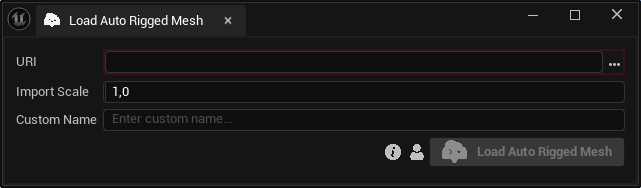
Inputs:
URI:The path to an existing local.glbauto-rig result. The file picker opens the project's.studiotwinfolder by default.Import Scale:A positive uniform scale applied while importing the GLB. The default value is1.0.Custom Name:An optional name for the imported skeletal mesh. Leave it blank to use the default name.