Tools
Tools Menu
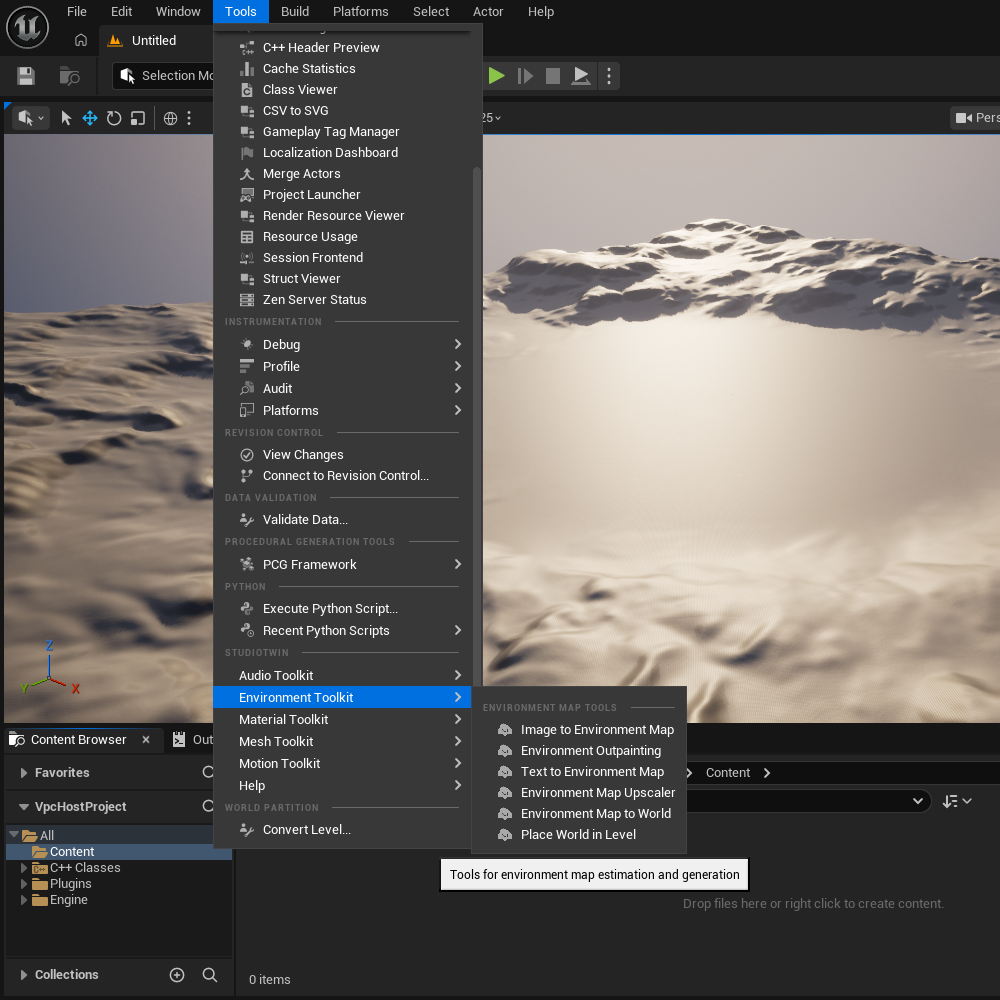
Navigate to the UE Editor main Toolbar and open "Tools". There you will find the StudioTwin section where you will locate the Environment Toolkit.
Context Browser
Texture2D

This is available only on Image to Environment Map, Environment Outpainting and Environment Map Upscaler tools. Assuming you already imported a 2D image in your Content folder (or created one with our tool), navigate to the imported Texture and right-click on it. You can locate the "Image to Environment Map", "Environment Outpainting" and "Environment Map Upscaler" actions. When you choose each action, the relative tab will launch with the texture already selected as input.
Ensure you distinguish between using your image as a style reference (Image to Environment Map) versus a central anchor for expansion (Environment Outpainting).
TextureCube

This is available only on Environment Map to World and Environment Map Upscaler tools. Assuming you already imported an environment map in your Content folder (or created one with our tool), navigate to the imported TextureCube and right-click on it. You can locate the "Environment Map to World" and "Environment Map Upscaler" actions. When you choose each action, the relative tab will launch with the environment map already selected as input.
Environment Toolkit features
This section outlines the core features of Environment Toolkit. Explore each page for more details, practical examples, and technical insights: