Texture to Material
Overview
Texture to Material generates a complete Unreal Engine material from a single texture input. It automatically produces albedo, normal, roughness, metalness and heightmap, extracting surface details and material properties with AI-driven processing. This tool enables users to convert textures into ready-to-use materials efficiently, ensuring accurate and high-quality results.
Tool Inputs
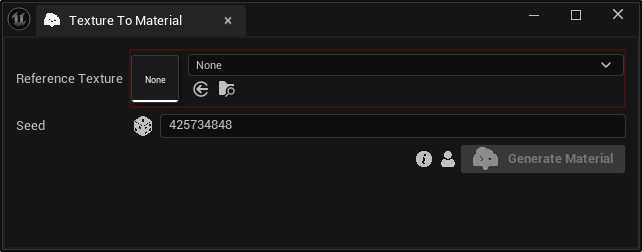
Inputs:
Reference Texture:The texture used as input to generate the material.Seed:A random number used for generating varied outputs with identical inputs. For instance, two materials with different seeds, might differ even with the same reference texture.
For the best results, use a square texture (1:1 aspect ratio) that exhibits clear surface details, such as fabric patterns, wood grain, or stone textures. Avoid images with lighting, shadows, or perspective distortion, as the tool is designed to process seamless textures for material generation. This ensures that our tool can accurately extract albedo, normal, and roughness maps for a high-quality material output.
Material Toolkit uses custom Template Materials to import your results. You can learn how to use a custom material during the import process at our Using Custom Parent Materials page.