How to Use the Results
This page will help you set up and use the world assets in your scene
World Data Asset
The "World Data Asset" is a custom Data Asset that serves as container that stores all generated components and parameters required to assemble the world and place it in your scene.
The World Data Asset is a specialized container that stores all generated components and parameters required to reconstruct a world. It serves as the central configuration hub for the environment, allowing you to quickly instantiate and configure the sky, terrain, and foreground elements within any level.
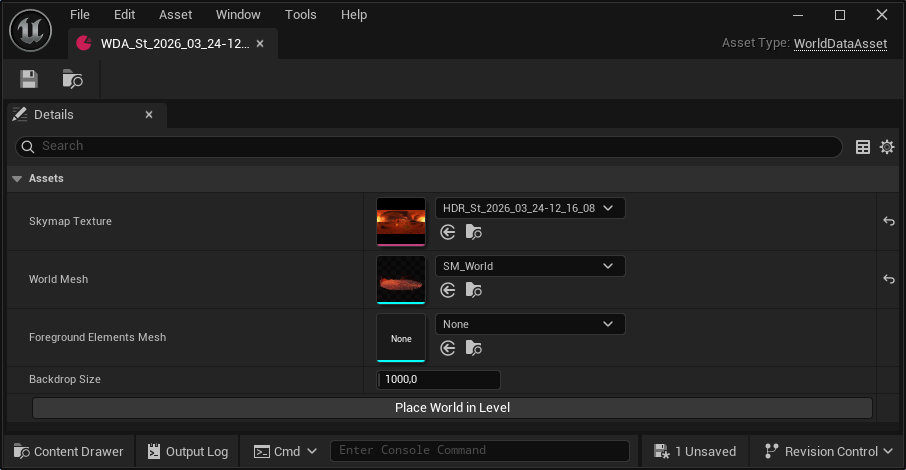
Properties:
Skymap Texture:The HDR environment map used as the primary source for lighting and sky visualization.World Mesh: The generated static mesh representing the distant terrain or world geometry.Foreground Elements Mesh: An optional static mesh containing extracted foreground geometry.Backdrop Size: Defines the projection scale of the HDRI. This value is used to dynamically calculate the relative scale of the World and Foreground meshes to ensure spatial consistency.
Functions:
Place World in Level: An editor utility function that automatically spawns and aligns the sky, world mesh, and foreground elements in the current level. It automatically handles the relative scaling based on the definedBackdrop Size.
Placing the results in your level
Once you have generated your assets, follow these steps to assemble the world in a new environment:
- Create a New Level: Go to
File > New Leveland select the Empty Level template. This ensures a clean workspace without conflicting lights or geometry. - Open the Data Asset: Locate your generated World Data Asset in the Content Browser and double-click to open it.
- Configure Backdrop Size: In the Details panel of the Data Asset, verify or adjust the Backdrop Size. This value is critical as it dictates the final scale of the entire environment.
- Instantiate the World: Click the
Place World in Levelbutton. The tool will automatically:- Spawn an HDRI Backdrop using the provided Skymap Texture.
- Place and scale the World Mesh and Foreground Mesh.
- Align all elements relative to the world origin (0,0,0).