Jobs
Monitor your generation jobs and download outputs.
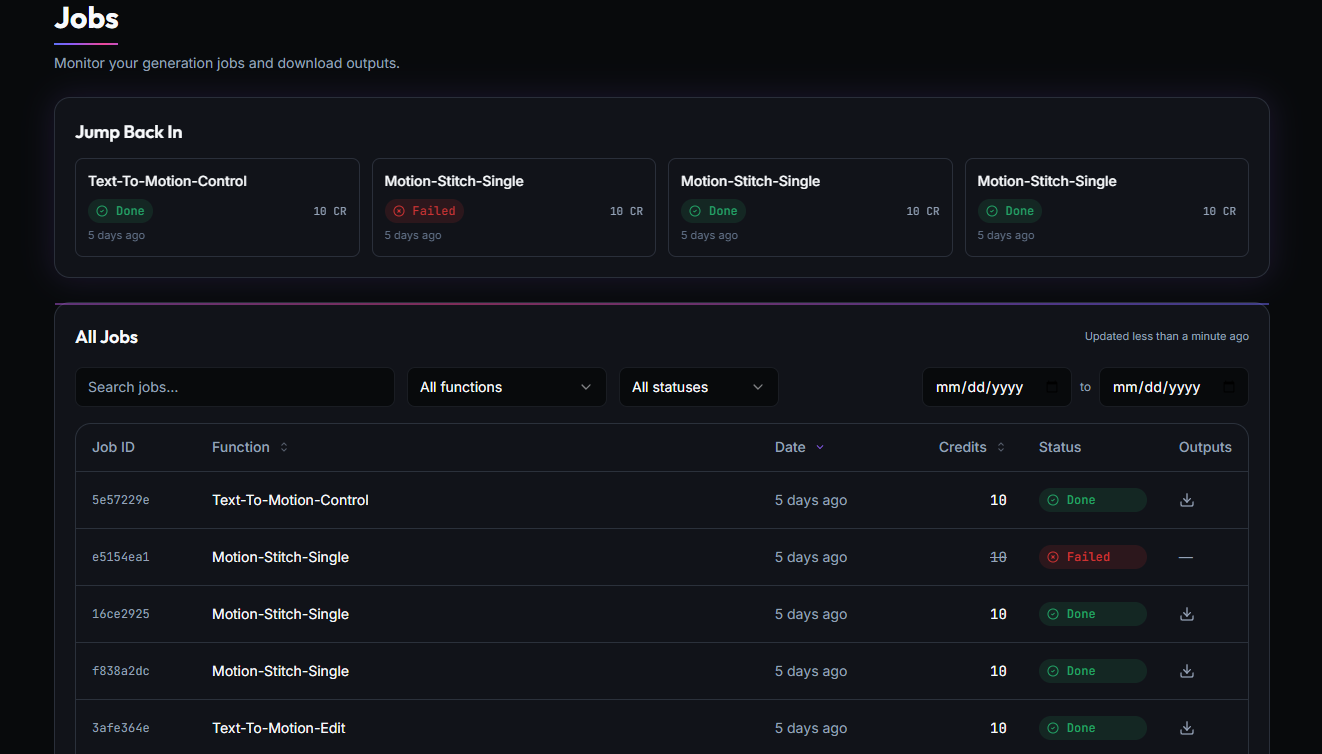
Jump Back In
A row of cards showing your most recent jobs. Each card displays the job name, its current status, when it ran, and how many credits it used.
All Jobs
The full table of all your generation jobs. It is sorted by date by default, most recent first.
Filters
Narrow the table by using the filters above it:
- Search: type a job name or ID to filter the list
- Function: dropdown to show only a specific toolkit or operation
- Status: dropdown to show only a specific status
- Date range: pick a start and end date to narrow the time window
Jobs Table
| Column | Description |
|---|---|
| Job ID | Unique identifier for the job |
| Function | The operation that was run, for example Text-To-Motion-Control or Motion-Stitch-Single |
| Date | When the job was submitted |
| Credits | Credits consumed. If credits appear struck through, the job was refunded |
| Status | Current state of the job |
| Outputs | Download icon if results are available, otherwise a dash |