Text to Sound Effect
Overview
The Text to Sound Effect tool generates generates high-fidelity audio assets from a simple descriptive prompt. It utilizes AI-driven synthesis to create production-ready sound effects from scratch based on your input, offering precise control over playback characteristics. The tool features customizable duration settings, including an auto-calculate option to match the sound’s natural decay, as well as a seamless looping toggle for ambient or repetitive effects. This enables users to produce tailored audio instantly, removing the need for exhaustive library searches or manual editing while ensuring professional-grade results within Unreal Engine.
Tool Inputs
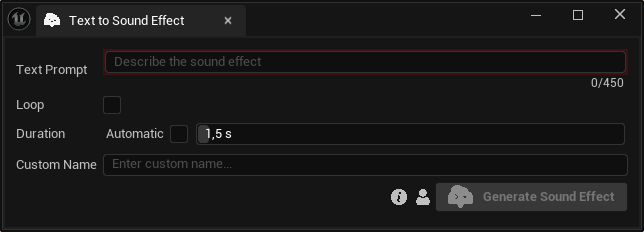
Inputs:
Text Prompt:Text description of the desired sound effect. Maximum: 450 characters.Loop:A boolean setting that enables the generation of seamless, repeating audio, ideal for continuous background ambiances or repetitive mechanical effects.Duration:The audio length in seconds. Manual range: 0.5–30 seconds. Enable auto-calculate to determine it automatically.Custom Name:An optional name for the generated sound effect. Leave it blank to use the default name.