Trajectory Control
Overview
The Trajectory Control feature allows for precise path creation that characters will follow during motion generation.
Tool Inputs
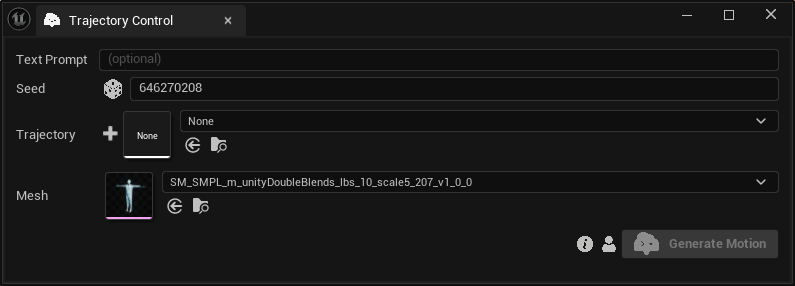
Inputs:
Prompt:A text prompt describing the motion.Seed:A random number used for generating varied outputs with identical inputs. For instance, two generated motions with different seeds, might differ even with the same text prompt and trajectory.Trajectory:Press the+button to generate a new trajectory. Use the dropdown asset picker to utilize an existing one.Bindings:A list of all bindings that contain a Transform Track.
Trajectory Design
You can define the trajectory for your character in 2 ways:
-
Design your own trajectory: If you want to design a trajectory on the fly, you can press the "+" button next to the "Trajectory" field, which generates and opens a new Level Sequence at the Sequencer with the SMPL Skeletal Mesh spawned at your current Level. That mesh contains a Transform Track in the Level Sequence with 2 keyframes at frames 0 and 300 (a straight line by default). Within the Sequencer, you can insert and edit as many keys as necessary to shape the desired trajectory.
-
Use existing trajectory: If you already have designed a trajectory in an existing Level Sequence, you can choose it from our asset picker in the Trajectory field. Once you do that, a list will be populated in the "Bindings" field with all the bindings that contain a Transform Track. You can choose the transform track that has the keys of the desired trajectory.
Please note that the system currently considers frames 0 to 300 in the Sequencer, so ensure your trajectory fits within this range.
Our template Level Sequence spawns the SMPL mesh for visual purposes. However, you can use any binding in a Level Sequence that has a Transform Track and contains Location keys. Taking advantage of the powerful tools of the Sequencer will allow you to design a very detailed trajectory.
Pay close attention when setting the Location keys in time; improper timing can result in unnatural motion due to the calculated speed at which the character moves along the trajectory.