Text to Motion
Overview
The Text to Motion tool allows you to generate animations giving one or more text prompts as input.
We usually structure the prompts as follows:
A person <describe action> <describe style>
For example:
A person is walking forward hastily
These prompt examples are a good starting point, but feel free to experiment and let us know which prompts gave you the best results! Also don't forget to visit our Prompt Guidelines section for more information.
Tool Inputs
Single action generation
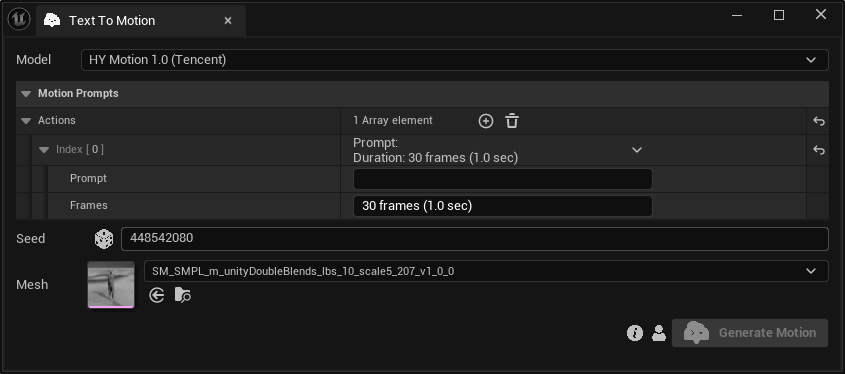
Inputs:
Model:Choose between “HY Motion 1.0 (Tencent)” and “Kimodo (NVIDIA)“.MotionPrompts:The set of actions. Each "Action" corresponds to a distinct motion that is defined by:Prompt:A text prompt describing the motion.Frames:The desired number of frames that the motion should last.
Seed:A random number used for generating varied outputs with identical inputs. For instance, two generated motions with different seeds, might differ even with the same text prompts and durations.
You can also describe multiple actions in a single prompt, using the "then" keyword and separating with commas.
Example: "A person is running forward, then stops and sits down"
However, we suggest using the Multi-action feature described below for this use case.
At the moment, the FPS value of a generated animation is always 30. The upper limit for a single action is 360 frames (12 seconds) at the moment. We are working to remove these limitations in the near future.
Multi action generation
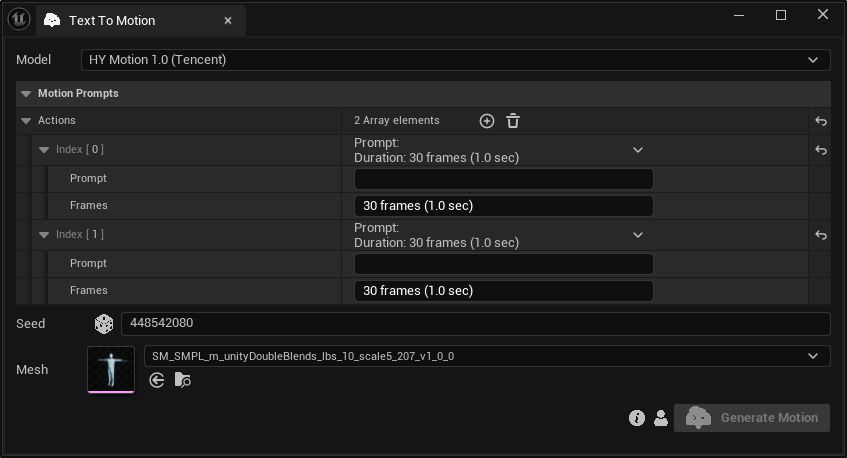
You can define one or more actions (multi-action generation) by adding or removing elements in the "Actions" array. The "Actions" defined will be "stitched together" to produce the final motion result.
You can use the multi-action feature to create animations that last longer than 12 seconds, which is the current limit of single-action generations.