Motion Edit
Overview
Modify existing animations with the "Motion Edit" tool. Select the animation to be edited via the input field or by dragging and dropping an "Animation sequence" .uasset from the UE Editor Content Browser.
Tool Inputs
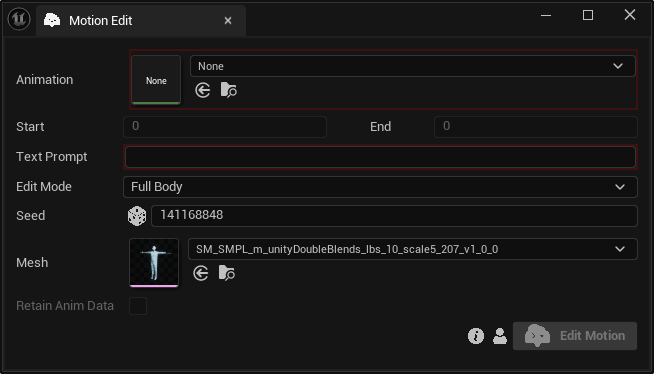
Inputs:
Animation:The animation to be editedFrame Selection: The start and end frames of the target animation segment.Prompt:A text prompt describing the new motionSeed:A random number used for generating varied outputs with identical inputs. For instance, two generated motions with different seeds, might differ even with the same text prompt, duration and edit mode.Edit Mode:Choose between “Full Body” (modifies all skeleton joints) or “Upper Body” (modifies only upper body joints).Retain Anim Data:Enable if you want to keep animation data that our model does not process.
info
Ensure the frame range is sufficiently long to accommodate the intended action.
info
Avoid selecting frames near the start or end of the animation.